Confidence follows sample size
Under 10 trades, confidence is capped at low. Under 30, at medium. The cap is shown next to what the AI claimed.
sample_size < 10 → lowOptions Strategy Hub replays your strategy minute by minute on historical SPY option quotes from your own Databento account, with an optional 1-second execution replay. Then AI Strategy Analysis explains the result using only numbers from your run, and every claim is labelled so you can tell a fact from a guess. Results are hypothetical: they describe the past, not the future.

Options Strategy Hub computes the statistics itself. The AI only interprets them, and the app checks every citation against the run before showing it to you. It can still be wrong: treat every statement as research, not advice.
Recorded by the backtest, or exact arithmetic on it: counts, P&L, dates, trade IDs.
Entries in the 1 PM hour won 1 of 14 trades and lost $762.
A statistic the app calculated. It describes this sample; it doesn't prove a cause.
Winners entered with stronger relative volume (1.8× vs 1.3×), d = 1.73.
An idea worth trying. It is never called "better" until it has been backtested.
Stop taking new entries after 1:30 PM.
Only allowed when a backtest of the changed strategy actually ran. Otherwise it is relabelled a hypothesis.
v2 vs v1 on the same period: 55 trades vs 96.
Example statements come from the sample run shown in the screenshots below.
Describe an idea, run it, ask why it worked or failed, test one change, and keep every version. The original strategy is never overwritten.
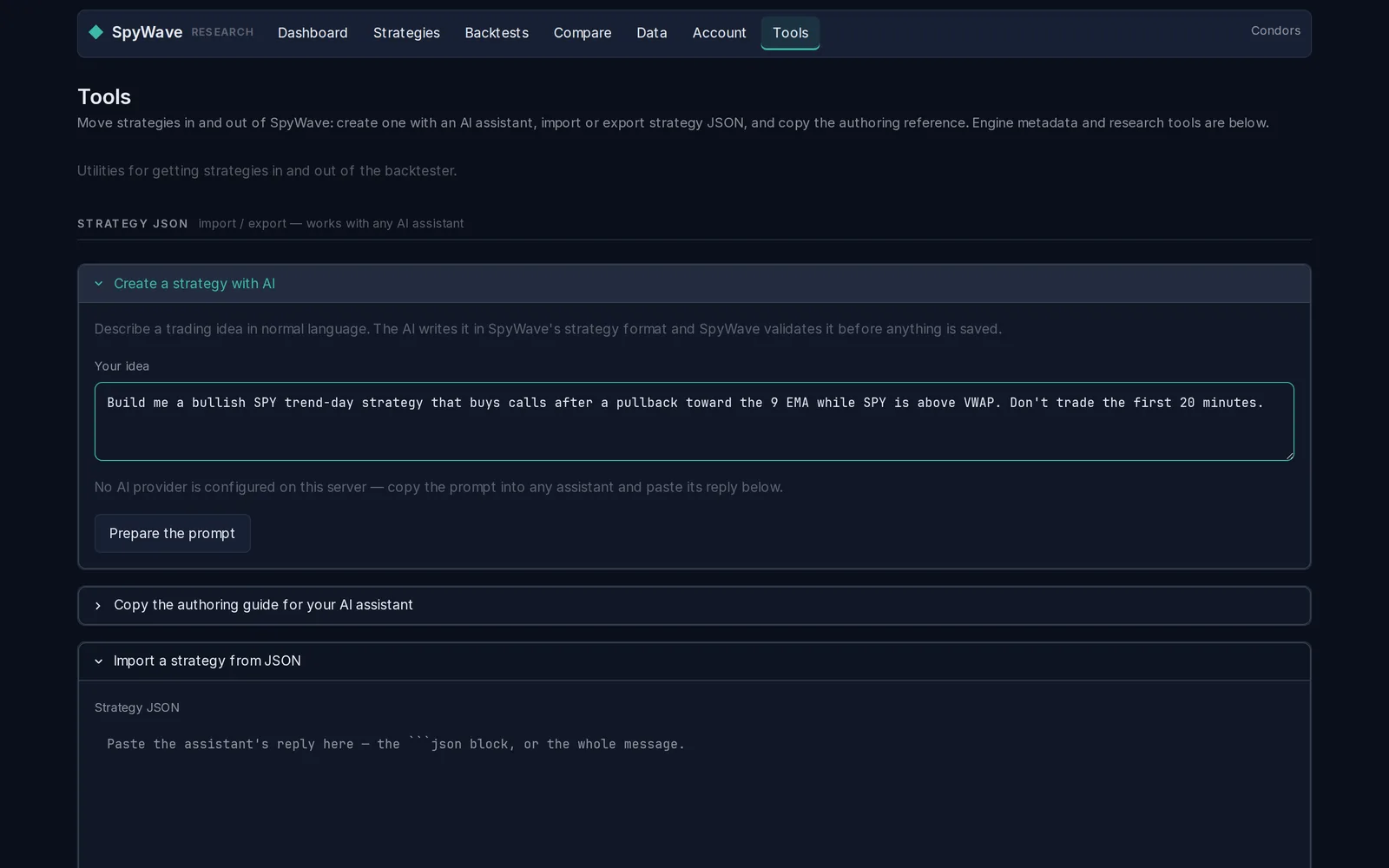
The AI gets the live indicator catalog and writes the strategy in the app's own format. It then goes through the same strict validation as anything you type, so a typo'd indicator or a stop loss written as 50 instead of 0.50 is rejected with a fix you can send back.
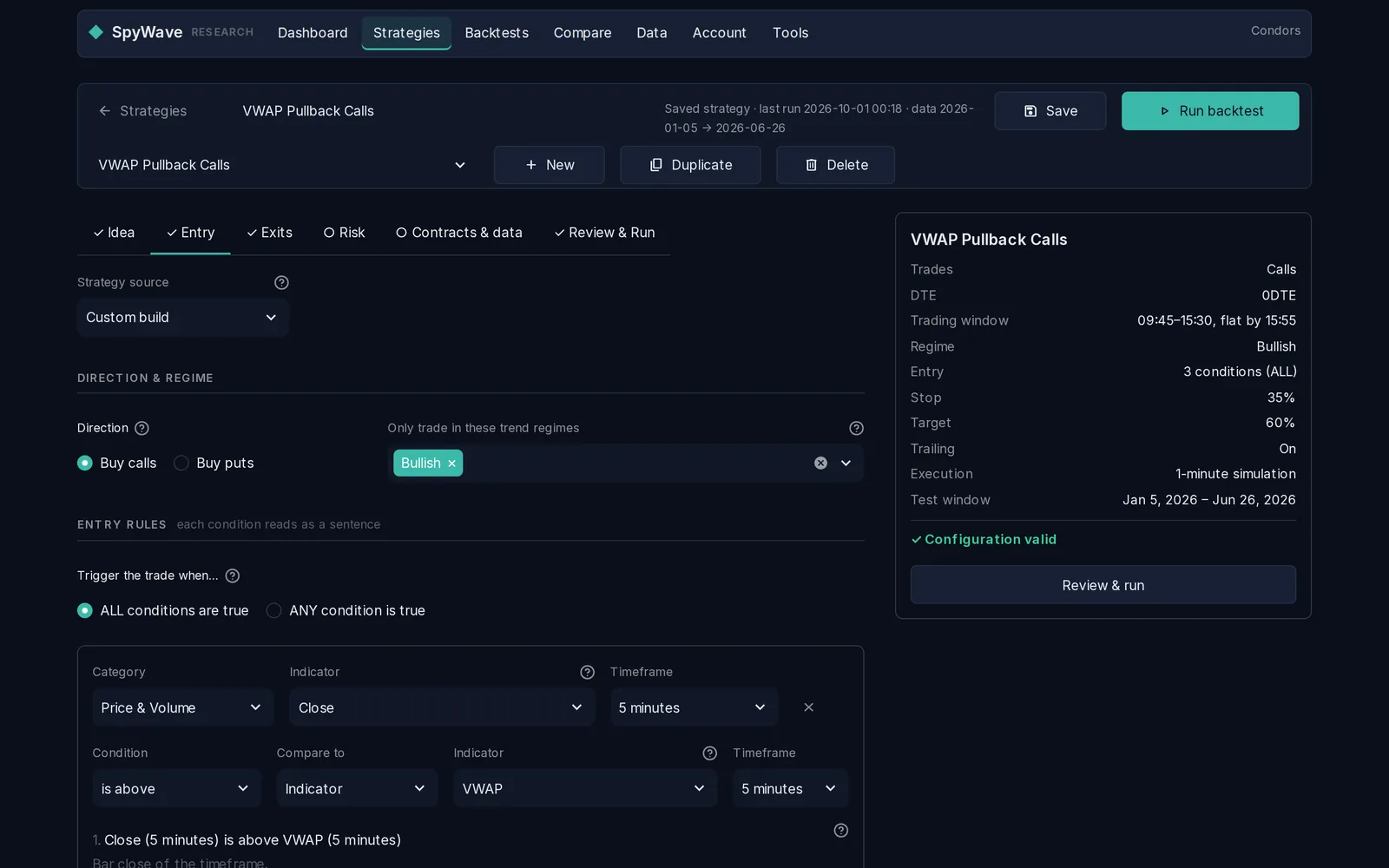
Entry rules on any timeframe from 1 to 60 minutes, trend-regime filters, Greek filters for contract selection, stops, targets, trailing and breakeven exits, and time and risk limits. A live summary checks the configuration as you go.
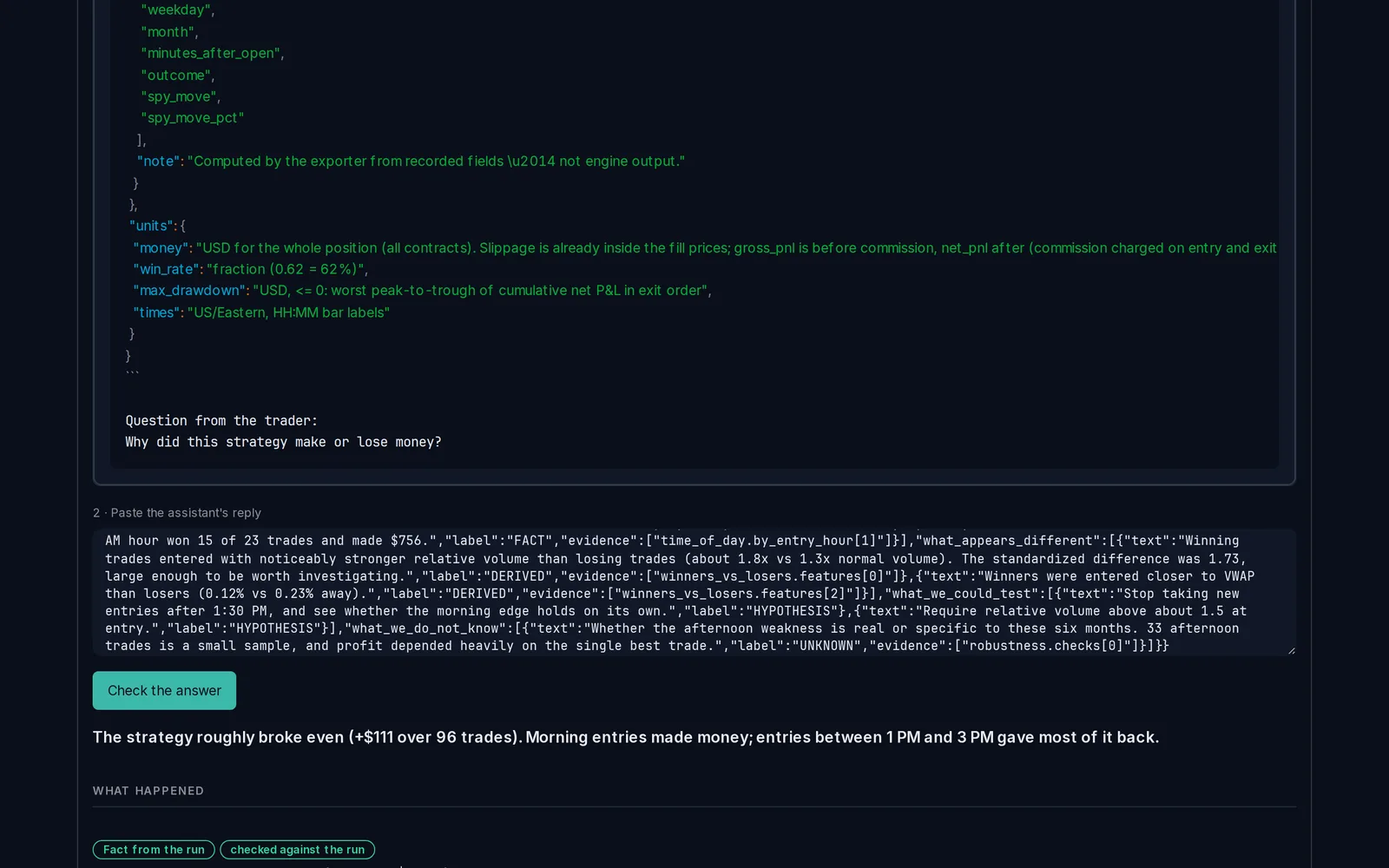
Answers are organised as what happened, what appears different, what we could test next and what we still don't know. Each statement is labelled and linked to the numbers it came from. Invented figures and unknown trade IDs are flagged.
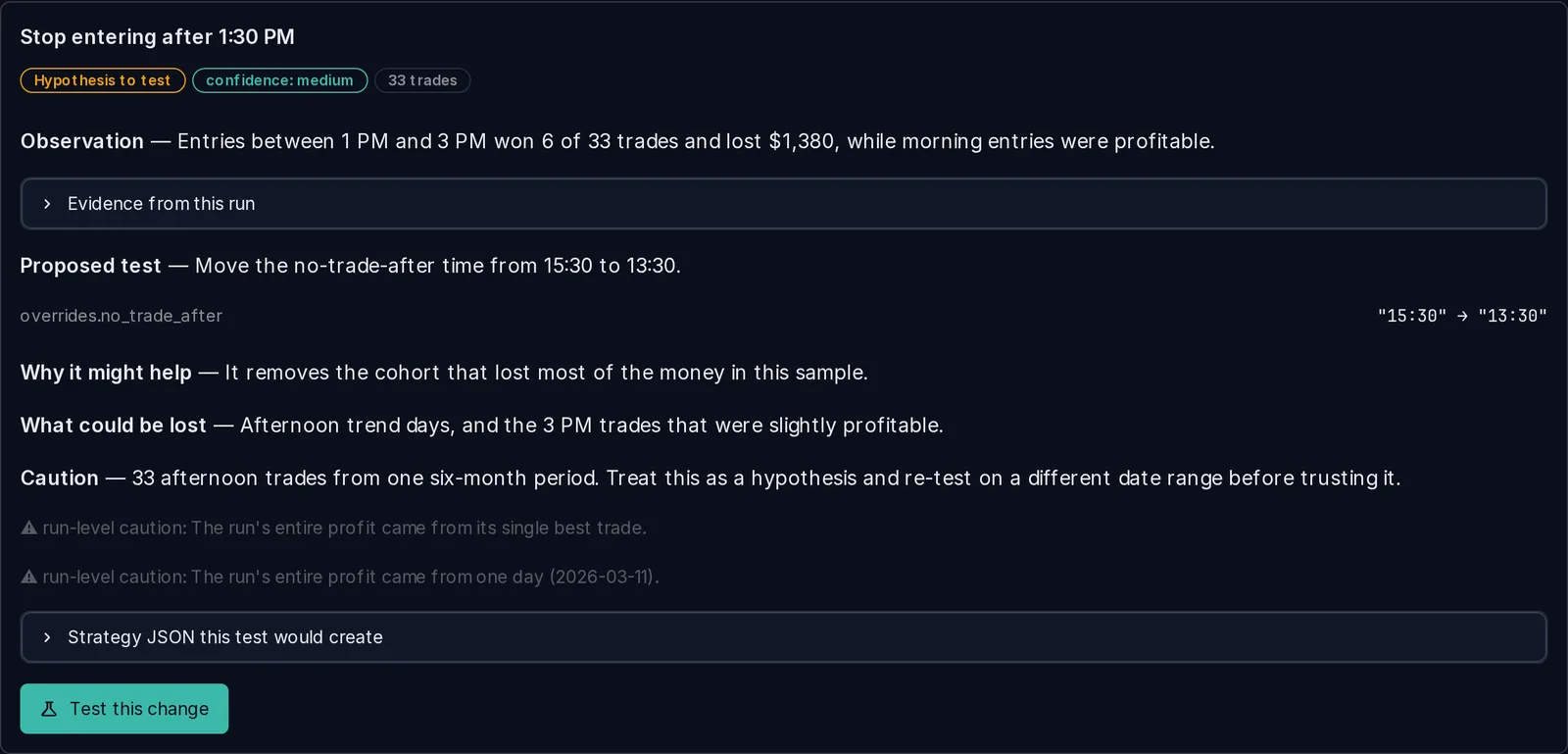
Each proposal states the observation, the evidence, the exact field it would change, what it might help, what could be lost, and how much the sample can support it. Choose Test this change and the app saves a new version beside the original, validated and ready to run. Nothing changes until you choose it.
Compare versions side by side. The app lists every rule and setting that differs, from each run's recorded configuration. A better number on the same dates is still one sample, so the app says so and points you to an out-of-sample re-test.
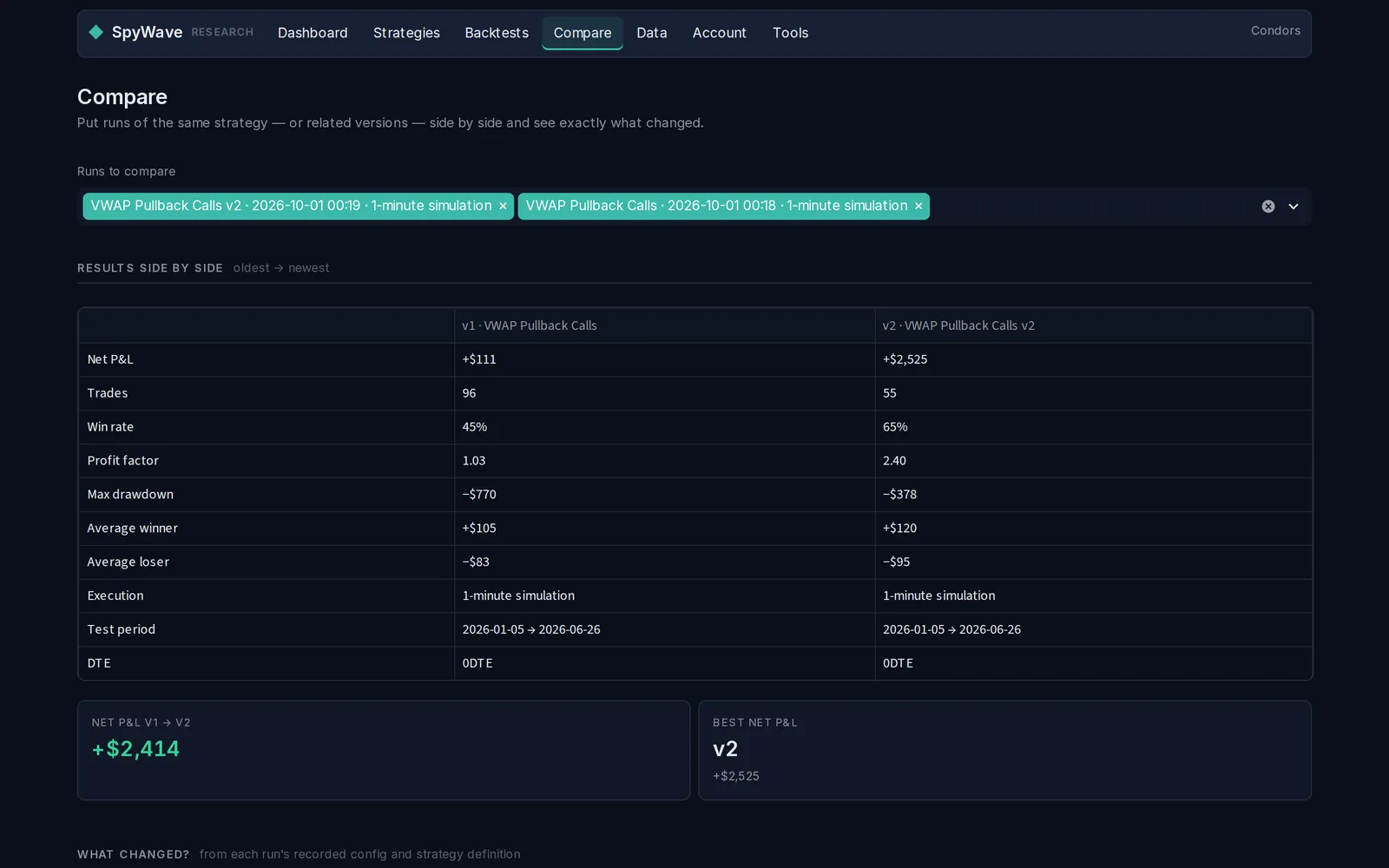
"Improve my strategy" is easy to turn into an optimizer that memorises the past. Options Strategy Hub applies these checks itself, whatever the AI claims. They reduce the risk of fooling yourself; they cannot remove it.
Under 10 trades, confidence is capped at low. Under 30, at medium. The cap is shown next to what the AI claimed.
sample_size < 10 → lowProposals that change several things at once, or jump a threshold far from its current value, are flagged as hard to attribute.
15:30 → 13:30If the whole profit came from one trade or one day, every proposal carries that warning.
net without best trade ≤ 0A change is rejected if its "from" value doesn't match your strategy. An AI that misread the strategy can't slip a change through.
from must equal currentRefinements become new versions: v2, v3… The original strategy and its backtests are untouched.
VWAP Pullback Calls v2Each version records its parent, the run that suggested it, and the exact change, which the app computes itself.
parent_strategy_hashFor every entry feature, including your own rule's values at the signal bar, the app shows averages, medians, sample counts and a standardized difference, and marks which gaps are large enough to investigate.
It also explains why setups didn't trade: time windows, risk limits, the market-structure gate, and which contract filters rejected candidates. Anything the engine doesn't record is marked as not recorded, never shown as zero.
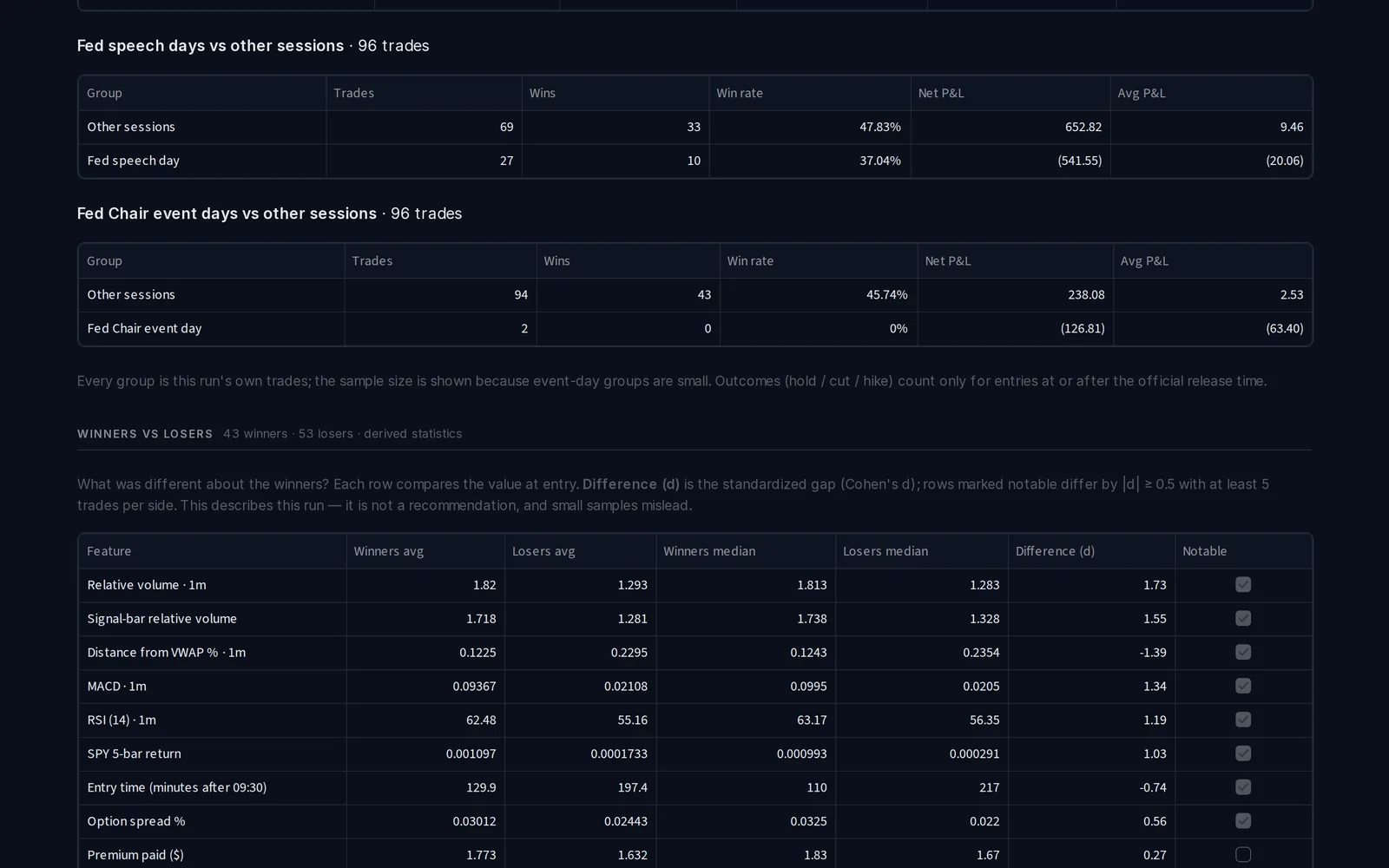
Every run exports as a self-describing bundle. Spreadsheet users, Python notebooks and AI assistants each get a format made for them, with the same numbers underneath.
A plain-English README, headline results already calculated, and every report as a spreadsheet.
Full datasets as Parquet with stable column names such as net_pnl and trade_id.
A compact analysis context and one structured record per trade, with credentials and file paths removed.
Your Databento key is stored encrypted on the server, for your account only, and used solely to fetch the SPY data each of your runs needs, under a maximum you approve first. Fetched market data lives in an isolated workspace for that run and is deleted when the run ends; only your strategy and the derived results are kept.
The AI assistant receives only your run's calculated evidence and strategy settings: no data keys, no file paths, no other runs. Without an AI provider set up, copy the prompt into any assistant you already use and paste the reply back. The same checks apply.
Both plans backtest SPY options on SPY historical data from your own Databento account: the app shows Databento's quoted cost of each run before you approve a maximum, and Databento bills that data to you separately from your Options Strategy Hub subscription. Subscriptions renew automatically; cancel anytime from the billing portal and keep access to the end of the paid period. Payments are handled by Stripe. Prices in USD, taxes may apply.
For building and testing strategies by hand, inspecting every trade, and using AI to understand what happened.
Build, backtest, analyze, let AI explain and propose a refinement, retest, compare. The whole loop, almost automatic.
Every Pro feature for $699 for the first year. After that it renews at the normal Pro annual price of $948/year.
| Compare plans | Basic | Pro |
|---|---|---|
| Standard backtests | 500/month | 2,500/month |
| 1-second execution replay | 25 runs/month | 250 runs/month |
| Saved strategies | 25 | 150 |
| Concurrent jobs | 1 | 3 |
| AI strategy analysis | Included | Full |
| AI strategy refinement | Limited | Full |
| Winner vs loser, attribution, regime, entry/exit | Not included | Included |
| Strategy comparisons | Basic | Full |
| Optimizer | Not included | 25 jobs/month |
| Walk-forward analysis | Not included | 8 jobs/month |
| Execution diagnostics and advanced exports | Not included | Included |
A standard backtest covers up to about six months of sessions with a normal strike window; larger runs count as more than one. Same-day and live data are not included in either plan. Founder seats are limited to 100 and allocated by Stripe in the order checkouts complete. See the Refund & Cancellation Policy.
Sign in at app.optionsstrategyhub.com (your account is created on first sign-in), accept the policies, pick a plan on the Account page, connect your Databento API key on the Data page, and run your first SPY backtest. Every run shows its Databento cost before anything is purchased.
Founding Beta scope: SPY options only (calls and puts, 0DTE to weekly). You need your own Databento account for market data; Databento is an independent data vendor and is not affiliated with Options Strategy Hub.
No. The backtest engine calculates every number. The AI reads the app's pre-computed evidence and explains it. If it cites a figure that isn't in your run, the statement is flagged. The AI can still misread evidence or propose a worse strategy; nothing it says is investment advice.
When live AI is enabled on the server, requests go to our configured provider (Anthropic) with only your run's computed evidence and your question, as the Privacy Policy describes. Otherwise the app shows you the prompt to paste into an assistant you already use, and checks the reply the same way.
Not by itself. Proposals stay proposals until you choose one. Then the app validates the change and saves it as a new version beside the original.
Buying single SPY options, calls or puts, from same-day expiry out to weekly, on historical data. SPY is the only underlying in the Founding Beta — no QQQ, IWM, single stocks or futures. It doesn't sell options or trade spreads in the main backtester. Contract selection uses your DTE, strike window, premium range, spread limit and Greek filters. It never places real orders and does not connect to a broker.
From your own Databento account. You connect your Databento API key once; each backtest then fetches exactly the SPY 1-minute bars and SPY option-chain sessions it needs into an isolated workspace and deletes them afterwards. Before anything is fetched, the app asks Databento for the price of that data, shows it to you, and only runs after you approve a maximum — it never spends past that maximum. 1-second execution adds a separate, capped amount. These Databento charges are billed by Databento under your own agreement with them and are separate from your Options Strategy Hub subscription; we cannot refund them.
Entries are assumed to fill at the ask (or between mid and ask) and exits at the bid, plus the slippage and commission you configure. The optional 1-second replay prices entries and exits off the second-by-second historical quote tape with a configurable delay. These are modelling assumptions, not prices you could have traded at: spreads, liquidity, market impact and latency make live fills differ, sometimes materially. See the Risk & Backtesting Disclosure.
A standard backtest covers up to about six months of trading sessions with a normal strike window. Longer periods, the full option chain, several expiries or many rule conditions count as more than one, so the monthly allowance reflects the work each run takes. The Account page shows your usage.
Yes. Upgrade, switch between monthly and yearly, update your card or cancel from the billing portal. A cancelled plan stays active until the end of the period you paid for and does not renew. Refund terms are in the Refund & Cancellation Policy.
No. Options Strategy Hub is research and simulation software made by SpyWave LLC. It is not a broker, investment adviser or trade-execution platform, and nothing on this site or in the app is investment advice. Backtests are hypothetical: they describe what a set of rules did on historical data and don't predict future results. Options, and 0DTE options in particular, can lose their entire value.
Yes. Account → Privacy & Data lets you download everything the app holds about you (strategies, backtests, cost history, consent record) as a zip and delete the account yourself. The Privacy Policy explains exactly what is removed and what must be retained.